SameBoy

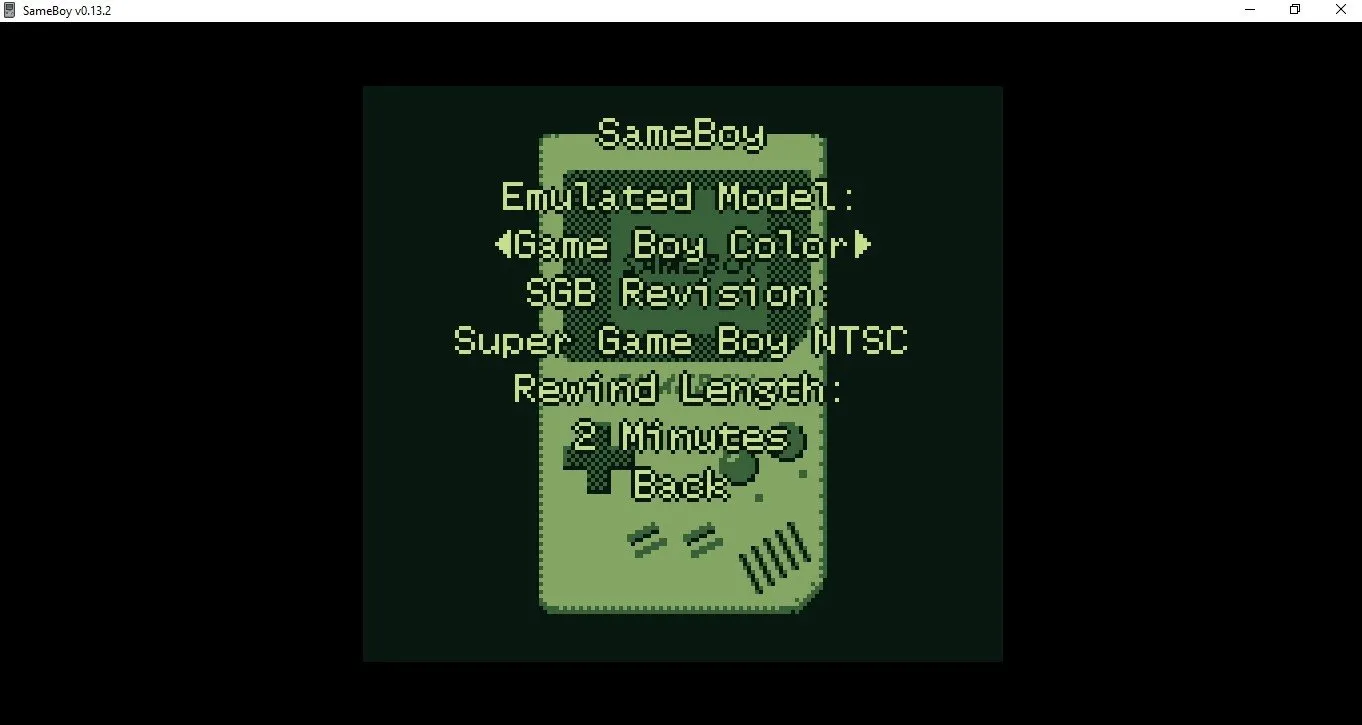
SameBoy is an open-source, highly accurate Game Boy, Game Boy Color, and Super Game Boy emulator available for macOS, Windows, and Linux. Known for its precision, extensive debugging tools, and user-friendly interface, it offers features like save states, custom shaders, and broad controller support. Ideal for both gamers and developers seeking authentic retro emulation.
windows ios mac

Gallery

About SameBoy

SameBoy stands as one of the most technically accomplished and user-friendly emulators available for Nintendo's iconic handheld consoles. Written in portable C, this open-source project provides native frontends for multiple platforms, including a sophisticated Cocoa interface for macOS, an SDL version for Windows and Unix-like systems, and even optimized ports for iOS and watchOS devices. What truly distinguishes SameBoy from its competitors is its uncompromising commitment to accuracy—the emulator successfully passes virtually all industry-standard test suites, including blargg's tests, mooneye-gb's acceptance tests, and Wilbert Pol's verification ROMs. This exceptional precision ensures that games behave exactly as they did on original hardware, preserving subtle timing effects and hardware quirks that other emulators might overlook. The emulator's dedication to authenticity extends to its audio capabilities, offering high-quality 96kHz sound output that significantly enhances the listening experience compared to original hardware limitations. For developers and homebrew creators, SameBoy provides an advanced text-based debugger featuring an expression evaluator, disassembler with symbol support, multiple conditional breakpoints and watchpoints, call stack tracing, and comprehensive memory viewing/editing tools. These professional-grade debugging capabilities make it an invaluable tool for ROM hacking and homebrew development. Beyond technical accuracy, SameBoy delivers a polished user experience with essential modern conveniences. Save states allow players to capture their progress at any moment, while a variety of scaling algorithms—including exclusive options like OmniScale and Anti-aliased Scale2x—ensure games look crisp on modern high-resolution displays, from 1080p to 5K Retina screens. The emulator also supports customizable interface themes, multiple color palettes for Game Boy games, and extensive controller compatibility with modern hardware from PlayStation, Switch, Xbox, and MFi controllers. Privacy-conscious users will appreciate that SameBoy maintains a completely ad-free and tracking-free environment, respecting user privacy without interruptions. The project's active development community continues to refine and expand its capabilities, with regular updates improving compatibility and adding new features. Whether you're a nostalgic gamer revisiting childhood favorites, a preservationist archiving gaming history, or a developer testing homebrew creations, SameBoy provides the accuracy, tools, and cross-platform accessibility to meet diverse needs. Its open-source nature invites community contributions, ensuring the emulator will continue evolving to preserve gaming heritage for future generations.

Features

High-accuracy Game Boy/Game Boy Color emulation
Super Game Boy support
High-quality 96kHz audio emulation
Advanced debugging tools for developers
Save state functionality
Multiple scaling filters and shaders
Customizable color palettes
Real-time clock emulation
Game Boy Camera and Printer emulation
Link cable emulation for multiplayer
Controller support (MFi, PlayStation, Switch, Xbox)
Open-source and free to use
Privacy-focused (no ads or tracking)
Retina/High-DPI display support
Turbo mode for fast-forwarding
Frame blending options
Multiple palette selection
Battery save support
Libretro core availability
Text-based debugger with expression evaluator
Memory viewer and editor
Conditional breakpoints and watchpoints
Disassembler with symbol support

System Requirements

Minimum Requirements

CPU

1 GHz x86 or ARM processor

Memory (RAM)

512 MB

Storage

50 MB

Write a Review

Reviews are moderated. Your review will be published after being approved by an administrator.

Have an account? Log in to post a review, or continue below with your name and email.

Share what you like or dislike about this emulator. Maximum 1000 characters.

Your email won't be published publicly.

Ratings & Reviews

No reviews yet

Be the first to review SameBoy.

SameBoy

Download SameBoy

Get the latest version of SameBoy and start using it right away.

Latest Version
1.0.3
Added
Mar 4, 2026
Download Now
1.55 MB
Free
Safe & Virus-Checked

Related Software

Dolphin logo

Dolphin

Dolphin is a free, open-source emulator that lets users play GameCube and Wii games on modern platforms like Windows, Linux, macOS, and Android. It enhances gaming with high-definition graphics, customizable controls, turbo speed, and online multiplayer, making it a top choice for retro gaming enthusiasts.
PCSX2 logo

PCSX2

PCSX2 is a free, open-source PlayStation 2 emulator for Windows, Linux, and macOS. It allows users to play PS2 games on PCs with enhanced graphics, save states, and customizable controls. Leveraging plugins and BIOS files, PCSX2 replicates the console’s hardware, offering improved resolution and performance. Popular among retro gamers, it preserves classic titles while modernizing the experience.

RPCS3 logo

RPCS3

RPCS3 is a free, open-source PlayStation 3 emulator enabling PC gamers to play PS3 titles on Windows, Linux, or macOS. It leverages advanced techniques like dynamic recompilation and Vulkan rendering to replicate the PS3’s complex Cell architecture. With growing compatibility, save states, and controller support, RPCS3 revitalizes classic games like Demon’s Souls and Persona 5 for modern hardware.

PPSSPP logo

PPSSPP

PPSSPP is a free, open-source PSP emulator enabling high-definition gameplay of PlayStation Portable games on PC, mobile, and consoles. It enhances graphics, supports save states, and offers cross-platform compatibility. Ideal for retro gaming enthusiasts, it revitalizes classic titles with modern features like controller support and multiplayer modes.

Yuzu logo

Yuzu

Yuzu is a free, open-source Nintendo Switch emulator for Windows, Linux, and Android. It enables users to play Switch games on non-Nintendo hardware with high compatibility and performance. Developed in C++, Yuzu supports resolution scaling, save states, and controller customization. Regular updates enhance game support and optimization, making it a leading choice for Switch emulation. Keywords: Nintendo Switch emulator, open-source, Yuzu, gaming, compatibility.